
When it comes to student testing and assessment time, having the right technology equipment in place is not just a nice to have, it’s essential. Fit for purpose devices, a reliable power source and a comfortable environment help to ensure assessments run smoothly and allow students to focus on demonstrating their knowledge rather than trouble shooting technical issues.
The right in-classroom tech set-up also helps support equity, giving every student consistent access to the tools they need to perform at their best. Dependable tech underpins fairness, efficiency and confidence for both students and educators.
We asked Lauren Evans, Head of Technology Solutions at Winc, to share three easy steps to help teachers prepare their classrooms for exam season.
1. Noise-cancelling headsets.
Using a headset during exams can help students engage more deeply with online practice tests, digital learning tools and exam tasks. Clean, uninterrupted audio reduces distractions and supports better comprehension, particularly in multimedia or language-based exams.
“The right headset can help students concentrate on the material presented to them and engage more effectively to give their best response. For exam preparation, it can allow students to make calls, exchange ideas and test each other’s knowledge for exam day performance.”
“Provide students with the right products at the outset, or replace ageing headsets that crackle or aren’t compatible. It’s also important that headsets have volume limitations and controls to help maintain a quiet test environment while allowing settings to be tailored to the needs of individual students without disrupting others,” shared Lauren.
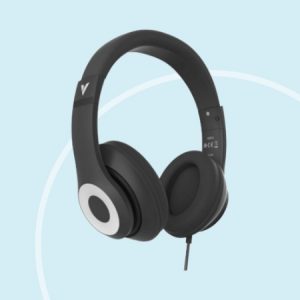
The Verbatim Classic Over-Ear Stereo Headphones are ideal for multimedia and video calls and can adjust to suit different learning environments. They guarantee a snug fit, catering to all head sizes for a personalised comfort and listening experience.
2. Set up a comfortable and efficient study and exam zone.
Teachers can support learning comfort by making small tech adjustments to existing setups especially if laptops or tablets are commonly used.
“If students are undertaking exams on tablets, offering a laptop experience can help improve speed and comfort by linking up a keyboard case instead of a digital screen that often takes up half the screen while in use,” explained Lauren.
The Logitech® Rugged Combo 4 for iPads offers military-grade drop protection, pluck-proof keys, and a full size keyboard that’s sealed against spills. It also features a secure connector that doesn’t need charging or pairing, it simply uses a Smart Connector to work.
“While all headsets offer the same sound functionality, consider going for a gaming headset that can be used for other applications in the classroom such as e-sports, testing or learning modules,” shared Lauren.
The Logitech® Astro A10 wired gaming headset can produce clear and detailed sound with an ultra-durable headband for comfort.
3. Stay powered and connected to keep going.
When preparing for online exams or digital assessments, teachers need to ensure devices are fully powered and can last for the duration of the exam. Connected devices can impact performance during study or exam time by draining battery life, so having high-quality chargers nearby or connected is critical. Consider the Verbatim Gan Charger 4 Port 140w which allows you to charge up to four devices simultaneously, from laptops and tablets to phones and gaming gear. It also has built-in protection against over-current, over-voltage, short-circuit, and over-temperature, keeping devices safe while charging at maximum efficiency.
“There’s nothing worse than being limited by your inbuilt battery life and having it fail during a timed exam session while others are powering through. Make sure you have the right external equipment such as power boards and charging cables to power webcams, headsets and other connected devices to keep student devices running until the exam is over and ready to recharge for the next one,” advises Lauren.
Also consider having some EnergizerMax Plus AAA Battery Pack 24 (also available in AA) for Bluetooth devices or when a quick energy boost is needed without waiting to recharge.
Or for a constant energy supply, look to the PC Locs Carrier 15 Charging Station, which powers up to 15 devices at once in a secure kit that safeguards against unauthorised access between exams.
Check out our new Technology Essentials offering to explore the range and to learn how we can support students with the right technology to be prepared and ready for the exam period. For more details, get in touch with a Winc Account Manager today.