

Cybersecurity is an ongoing threat for businesses, with the potential to compromise sensitive information and critical data.
While IT teams have robust systems, firewalls and software protections in place, cybersecurity can still be compromised by everyday physical habits and workspace setups. The Australian Cyber Security Centre (ACSC) responded to over 1,200 cybersecurity incidents between 2024-2025, representing an 11% increase from the previous year, and received 84,700 cybercrime reports 1.
With flexible work arrangements continuing to form an important part of the modern workplace, it’s vital that businesses ensure employees have the necessary tools to ensure data isn’t compromised.
We spoke with Lauren Evans, Head of Technology Solutions at Winc to uncover her top five tips on how you can decrease your physical risk of cybersecurity breaches.
1. Secure your data with backup and storage devices.
Saving sensitive files directly to your laptop or desktop device without proper backup can increase the risk of data loss, ransomware exposure or unauthorised access if a device is lost, stolen or compromised.
“Regularly backing up your files using approved storage and portable devices that offer encryption and security can help minimise the risk of information being exposed,” shared Lauren.
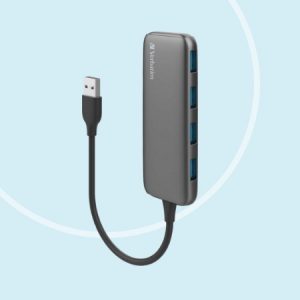
Consider using the Verbatim 4-in-1 USB 3.1 Gen 1 Hub which enables the transfer of files from your PC to external hard drives, USB drives and other approved storage backup tools to support safer file storage. The USB 3.1 Gen 1 technology allows for high-speed data transfers – moving large files quickly and efficiently.
2. Keep conversations private with a noise cancelling headset.
When conducting calls in or out of the office, sensitive information can be shared unintentionally through overheard conversations. Using a noise cancelling headset makes calls and meetings clearer to participate in, as well as reducing competing background noise.
“Using a headset keeps your sensitive or private discussions contained and reduces the need to compete with background noise, which often requires raising your voice to be heard. A headset also gives confidence to team members on a call that you’re mitigating the risk of their information being shared beyond the call,” explained Lauren.
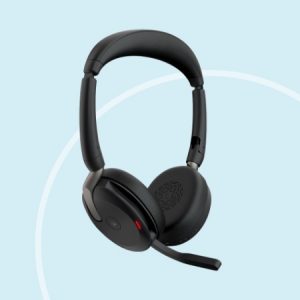
Opt for the Jabra Evolve2 65 Flex Wireless Stereo Headset. This headset features advanced noise-cancellation technology, ensuring clear and private audio. Its flexible design allows for easy storage, while the long battery life supports all-day use, enhancing productivity in any environment.
3. Protect on-screen information with a privacy screen.
If you are working on confidential documents or want to shield your screen from prying eyes, a privacy screen filter will do the trick. Suitable for both laptops and desktops, they offer a quick and easy solution to ensure data remains protected.
“A privacy shield on a monitor helps you confidently work privately without any worry of shoulder-surfing. They can also be easily attached and removed quickly, making them ideal for your workstation, hot desking or in a public space,” recommended Lauren.
The Kensington Magnetic Privacy Screen For 14 Inch Laptops provides a limited viewing angle of +/- 30 degrees and features blue light reduction by up to 22 per cent. It’s also available in a range of desktop screen sizes.
4. Create a safe working station with a docking station.
Docking stations help reduce the risk of a cybersecurity incident by encouraging each team member to use their own secure setup rather than connecting to unfamiliar equipment.
“Setting up a docking station reduces the risk of connecting to unsecured or unknown devices. It also helps by supporting secure network connections such as known Wi-Fi through ethernet cables. Another option is to use a data blocking cable, which can help protect your devices from data theft, malware and ransomware by allowing power-only charging from untrusted sources,” advised Lauren.
Make it happen with the Targus Universal USB-C DV4K Docking Station with 65W Power Delivery. This sleek and powerful option includes all the necessary ports and power you need in one dock. It offers numerous connectivity options such as two HDMI 2.0 ports, a combination of USB-A (3x USB 3.2 Gen 1 Type-A ports) and USB-C (1x 3.2 Gen 1 Type-C), plus Ethernet and audio ports. The addition of the Comsol 2m USB-A To USB-C Data Blocking Cable can assist with charging and privacy especially in public places with shared Wi-Fi connection, such as airports.
5. Prevent device theft with laptop locks.
Unattended devices are exposed to theft or tampering. A laptop lock device can help securely reduce the risk and protect content from being accessed.
“A laptop lock is easy to install and gives you confidence that your laptop stays where you left it. A simple, durable combination lock provides piece of mind when in the office or busy co-working space,” recommended Lauren.
“For password-less convenience without compromising security, a biometric fingerprint key, ensures ultimate protection for laptops.”
The Kensington Slim Combination Laptop Lock is a slim solution that safeguards your laptop and data. For another layer of protection, the Kensington Verimark Guard Usb-C Fingerprint Key offers strong single-factor (passwordless), two-factor and multi-factor authentication.
Check out our new Technology Essentials offering to explore the range and to learn how we can support your employees with the right frontline cybersecurity solutions. For more details, get in touch with a Winc Account Manager today.

References:
1. Annual Cyber Threat Report 2024–25 fact sheet For businesses and organisations
cyber.gov.au/sites/default/files/2025-10/Annual Cyber Threat Report 2024-25 factsheet for businesses and organisations.pdf

